Grade in the Negative Space
Film Negative Space CST
Negative Space is Cool
This DCTL is a companion tool to Photo Chemist OFX but is extremely capable all on it’s own. It’s purpose is to convert Photo Chemist’s negative space into something that your usualy color grading tools will understand so you can grade after your negative stock design and under your print stock, just like a real physical photochemical system.
However, it also talks to pretty much every other log curve and can do some more magical things to how your tools react and respond.
Use it with Photo Chemist or use it on it’s own… The world is your oyster. I think it’s so cool you don’t have to be a happy little noder to get it…. But if you want to be one that supports me. Learn more below.
Get access to all the tools you see on YT and any updates that happen. One low annually fee. Just $47.34 - Will never be raised and gets you all the tools, all the updates
How to use on it’s own
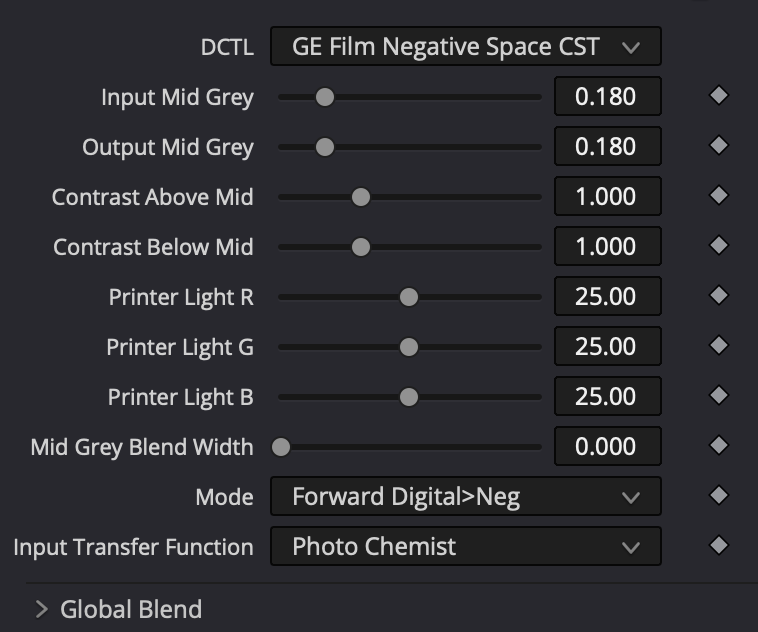
Choose your mode and your log input curve.
Forward Digital>Negative - This tells the dctl to work in sandwich mode and only goes in one direction
Invert Negative > Digital - This reverts back the changes done in the first node if you used Forward
Animal Style - It goes in and out but the printer light controls are contextual to the space in the middle and our baked in.
Transfer functions run the gamut of various log curves
Adjust your input Mid Grey to match the MidGrey linear value of your input transfer function. DW/I is default at 0.18
Adjust Output Mid Grey to the linear point that you want it. I like .420
Adjust Contrast above or below to expand or contract how closes the relative stops are.
If using in a two node Sandwich, Copy your settings to the closing node and change your mode to the opposite
Grade in the middle and have fun.
How to use with Photo Chemist
Set Photo Chemist to output Neg Scan. Then insert this CST. Set to Invert Neg - Digital and ITF as photo chemist.
Adjust settings to get a reasonable log curve to grade in
Copy Settings to Closing Node before your Photo Chemist Print side set to Print Only
Change Mode to Forward Digital > Negative
Grade in the film negative space with your favorite tools