

a better way to slice and dice your colors
Color Slice o’Matic
Now this is the way to cut colors
Color Slice in native Resolve is nice an all but it is convoluted, and complex. This tool is complex too but has some more features that makes it more robust at selecting and dissecting your colors.
Grab a copy of the demo or sign up to be a happy little noder and get access to all my premium tools.
Get access to all the tools you see on YT and any updates that happen. One low annually fee. Just $47.34 - Will never be raised and gets you all the tools, all the updates
Watch a Tutorial Video
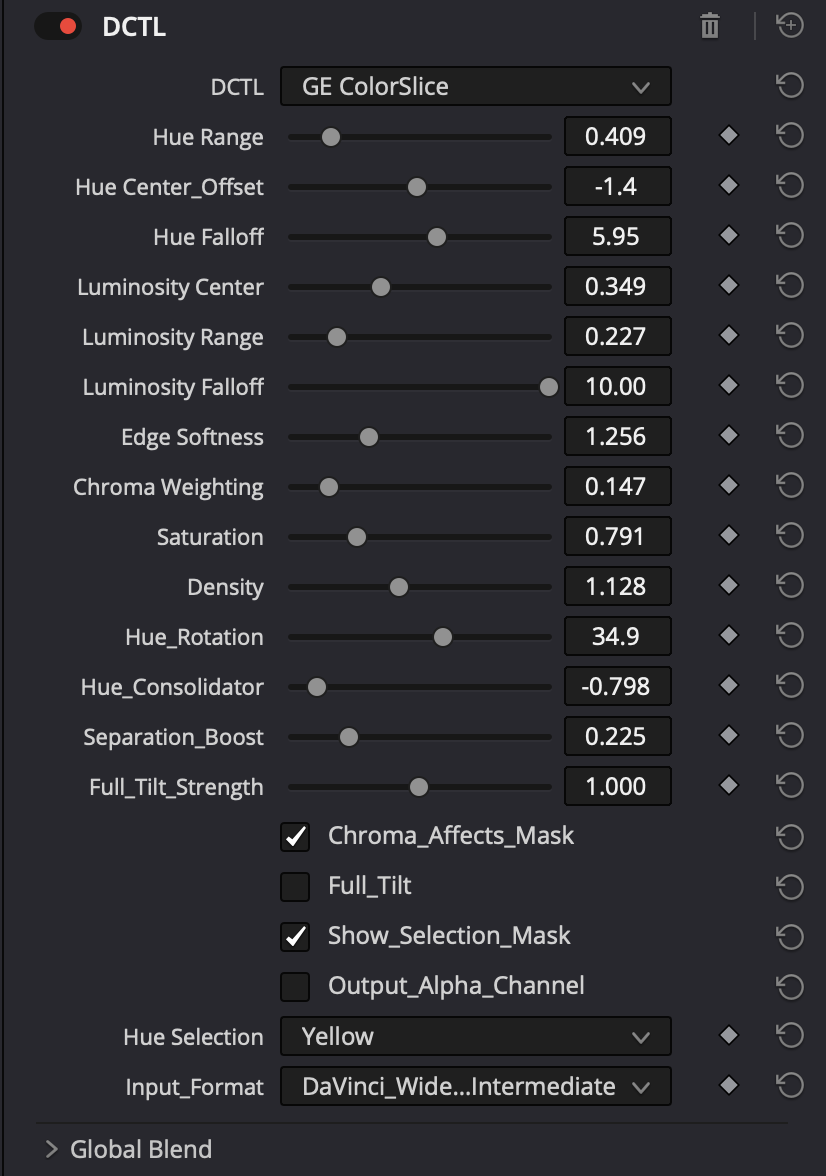
What Does What
-
Start by picking a narrow range, the center is initially selected by the Hue Selector Dropdown but you can shift it. While viewing the selection with a narrow range you can target your colors and then expand the range to capture more. Falloff controls how fast the mask ends.
-
Operates similar to the hue control letting you narrow your selection to just a certain luminosity range.
-
Adjusts the tail of the selection in terms of how soft the edge of the masks are.
-
This protects colors that are near neutral from being effected by the color shaping controls to follow, putting more of the impact on stronger chroma colors.
-
Increases or decreases saturation for you slice selection
-
Increases or decreases the relative brightness/luminosity of the selected hue. Think color wheel as a sphere.
-
Bends the selected hues toward a new hue…
-
Either collects the selection and bends them towards the hue center, or pushes them away from the hue center. This operation happens before the Hue Rotation control
-
Makes changes to the part of the image you didn’t select to make your selection stand out by lowering the relative luminosity.
-
Instead of selecting a hue, this does something fancy and makes a density based selection… Good for doing a full wash of changes on the image.
-
This tells the chroma weighting control to effect how the masks are defined.
-
Allows you to push your selection to other nodes, just make sure you turn off Alpha effects blending in your node settings.